Choosing the right Databox plan and billing cycle helps ensure that your analytics setup aligns with your team's needs and budget. Whether you're just starting to track performance across tools or managing complex reporting workflows at scale, Databox offers flexible plans and billing options to support you. This article outlines the differences between each plan, available billing cycles, and other common subscription-related questions to help you make the best decision for your organization.
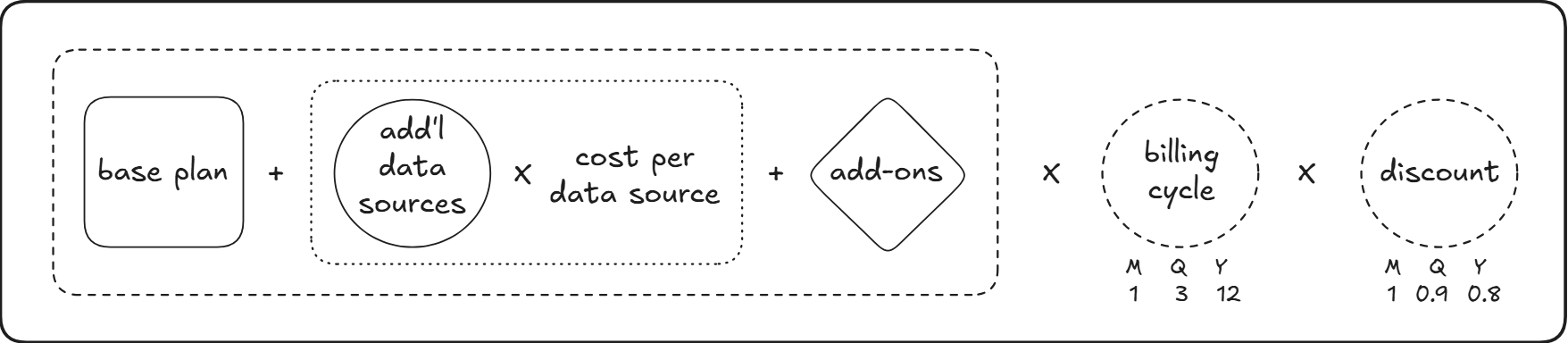
Your total Databox subscription cost is determined by a combination of the following components:
- Base plan: All accounts start with a base plan that includes a set of features along with a predefined number of data sources, users, and monthly AI credits.
- Billing cycle: This is how often you're billed — monthly, quarterly, or yearly. Longer billing cycles offer discounted pricing, which applies to your base plan, extra data sources, and any enabled add-ons.
- Additional data sources: Depending on your plan, using more data sources than your allowance either adds a prorated charge — recalculated at the start of each billing cycle — or requires upgrading to a plan with a higher allowance.
- Client packs: Agency accounts scale capacity through client packs, an add-on that bundles both additional client capacity and a set number of data sources.
- Add-ons: Optional features that enhance your account can be activated for an additional recurring fee. Add-ons are billed immediately upon activation and prorated according to your billing cycle.
Calculation formula: (base plan + (additional data sources x cost per data source + add-ons) × billing cycle × discount
Every plan includes a monthly AI credit allowance. If you use it up before the billing cycle resets, you can purchase extra credits as a top-up billed separately from your subscription — see Top up your AI credits.
Databox's plan lineup depends on your account type.
Standard accounts can self-serve sign up for three subscription plans — Free, Analyst, and Team — each scaling users, data sources, and AI credits to fit different team sizes. Teams that want a dedicated AI implementation service on top of Databox can work with sales on a Custom plan.
For a full comparison of features, visit our Pricing page.
The Free plan is your entry point into agentic analytics, giving you BI grounded in real context without paying for a subscription. It connects your cloud data sources and puts Genie, Databox's AI analyst, to work summarizing performance so you can quickly see how your business is doing. You also get access to core BI features and a governed semantic layer, which keeps your metrics and definitions consistent as your data grows. This plan is designed for individuals who want a simple way to start centralizing data and exploring Databox's reporting capabilities before scaling up.
The Analyst plan is an open platform for solo analysts, builders, and business owners who want to get the most out of Databox on their own. On top of everything in Free, it opens up custom data integrations so you're not limited to pre-built connectors, along with Artifacts and pre-built skills that extend what Genie can do for you. Analyst also includes MCP server and API access, giving you the flexibility to connect your own LLMs and build custom workflows around your data. It's built for a single user who wants full control over how their analytics environment is configured.
The Team plan is built for collaborative analytics, extending everything in Analyst to teams that want to automate their workflows with AI. It adds Routines, which let you schedule and run recurring AI-powered tasks, along with custom skills you can build for your specific use cases. Sharing and notifications keep the rest of the team in the loop, and upcoming Agents and MCP connectors will extend automation even further.
Team comes in two tiers, Core and Scale, which share the same feature set but differ in capacity. Core is built for smaller teams just starting to collaborate, while Scale raises the limits on users, data sources, and AI credits — giving fast-growing teams room to add more people, connect more data sources, and run more AI-powered work each month.
The Custom plan is more than software — it's a dedicated AI implementation service built around your organization's needs. Databox audits your current setup, designs an AI stack tailored to your data and workflows, and builds and integrates it for you. The team continues to optimize the implementation as your needs evolve, and you go live with an embedded engineer who stays engaged to support your account. Contact sales to scope a Custom plan built around your organization.
Agency accounts subscribe to a single Agency plan, built for agencies, consultants, and other service providers that manage performance and reporting across multiple clients. It brings the same AI-powered core as Databox's standard plans — Genie, performance summaries, Routines, and custom skills — into a workspace built for handling many clients at once, with sub-accounts, bulk actions, and cross-client reporting to keep everything organized as your client list grows. Instead of individual data sources, Agency plan capacity scales through the client packs add-on, which bundles room for managing more clients along with additional data sources.
If your account is on the Starter, Professional, Performer, Growth, or Premium plan, your current pricing, features, data source allowances, add-ons, and billing cycle options continue to apply. These plans are simply no longer offered to new subscribers, who instead choose from the plans described above.
You can choose or change your subscription plan from the Settings > Plans page in your Databox account.
If you're currently on a trial, click Change Trial Plan to explore and switch to any of the available paid plans. This allows you to experience the features of a different plan before committing.
Once your trial ends, you'll be automatically subscribed to the plan selected during your trial unless you update it before the trial period expires.

Databox offers three billing cycles for all paid subscription plans:
- Monthly
- Quarterly — includes a 10% discount
- Yearly — includes a 20% discount
Each subscription is tied to a billing cycle anchor date, which determines when your next payment is due. This date is set either when you manually activate your subscription or when your trial ends — whichever comes first — as long as a valid payment method has been added to your account.
Here are a few examples of how billing works across different cycles:
- A monthly subscription with an anchor date of September 2 will always renew on the 2nd of each month.
- A monthly subscription with an anchor date of January 31 will renew on the last day of each month that most closely matches the anchor — February 28 (or 29 in leap years), then March 31, April 30, and so on.
- A quarterly subscription starting on July 1 will renew on the 1st day of each quarter: October 1, January 1, April 1, etc.
- A yearly subscription with an anchor date of May 4 will renew annually on May 4.
If you're considering switching billing cycles, remember that discounts apply to longer-term commitments — and your billing anchor date stays consistent unless you make a change to your subscription.
FAQ
Can I subscribe for more than one year at a time?
If none of the available options meet your needs:
- If you're exploring Databox: Book a demo with our team to discuss longer-term subscription options.
- If you're already a customer: Schedule a meeting with your Account Manager to explore available options.
You can also reach out via chat or email at help@databox.com for assistance, and our team will route your request to the right contact.
Do you offer discounts for non-profits or charitable organizations?
No special discounts are currently offered beyond those available through longer billing cycles (quarterly and yearly plans).
Is there a Free plan available for agency accounts?
No, Databox does not offer a Free plan for agency accounts at this time.
What happens if I add data sources to a legacy plan mid-term?
If you're on a quarterly or yearly legacy plan and connect more data sources than your plan includes partway through your billing term, Databox charges a prorated amount for those additional sources on your next anchor date, covering the time remaining until the end of your subscription term.
What happens if I remove data sources from a legacy plan?
Removing data sources during an active billing period doesn't generate a refund or credit for the time already paid. The open slots you free up stay paid for and can be reused for other data sources you add. Your data source count and any associated charges are recalculated starting from your next billing cycle.


