
Google Sheets can pull in data from a few different sources, but the right approach depends on where that data is coming from. Importing an existing file, like a spreadsheet export or a CSV, is built into Google Sheets. Importing data from an API, however, usually means working with JSON (JavaScript Object Notation), a format Google Sheets has no native support for.
This article covers both: the quick, built-in way to import a file, and a custom solution for pulling JSON data from an API.
Google Sheets can import existing spreadsheets and data files directly, which is the fastest way to bring in a one-time export or a file you already have. Follow Google's guide to importing data for instructions.
Google Sheets doesn't have a built-in way to import JSON, even though it's the format most APIs use to serve data on demand. Google Sheets does ship with a few functions for other structured formats — IMPORTXML, IMPORTHTML, and IMPORTFEED among them, documented here — but none of them parse JSON.
The most common workaround is ImportJSON, a community-built Apps Script that adds a custom =ImportJSON() function to your sheet. It fetches a URL and converts the JSON response into the two-dimensional table format Google Sheets expects.
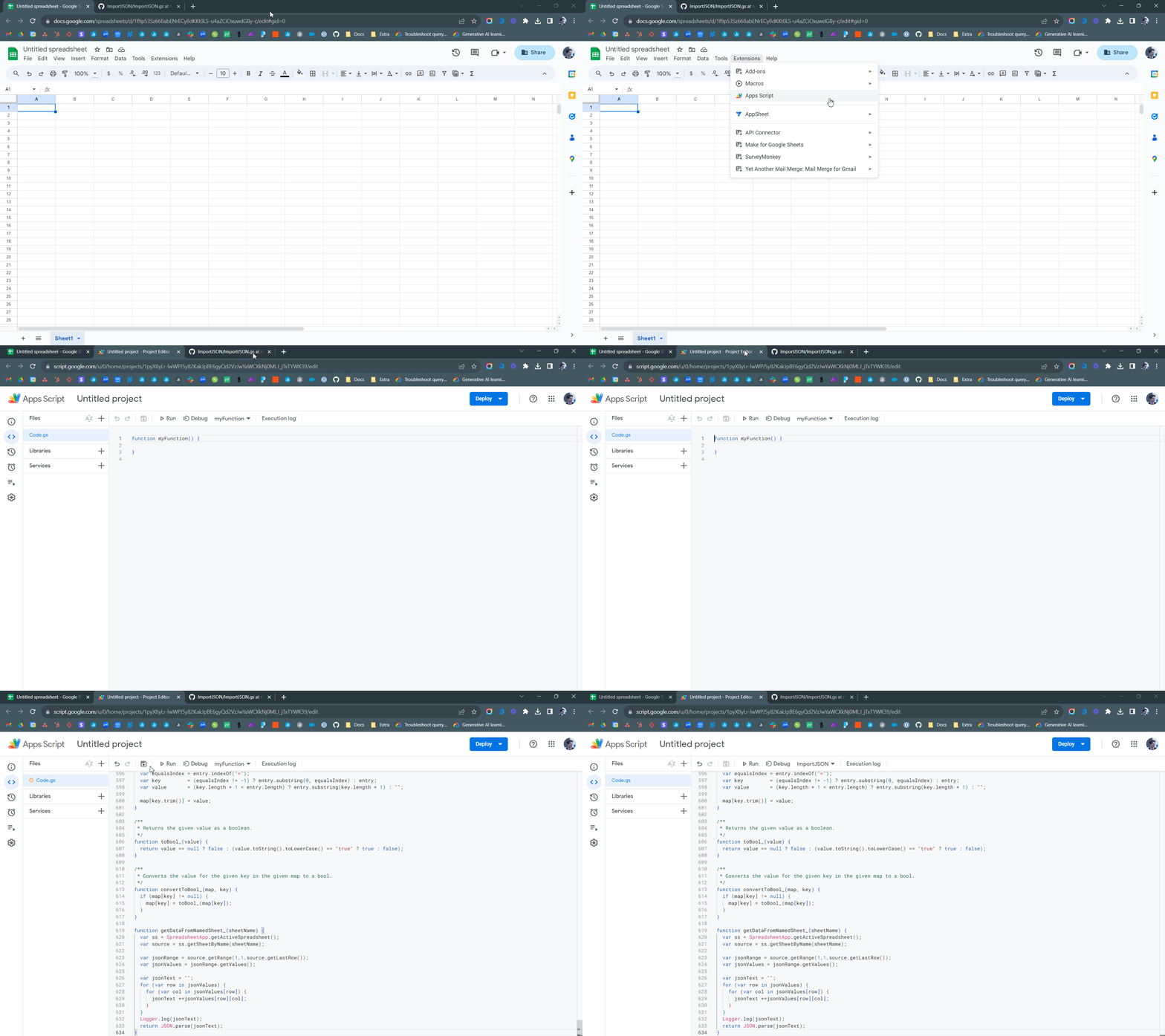
- Copy or download the script from its GitHub repository.
- With the Google Sheet open, go to Extensions > Apps Script.
- Replace the contents of the Code.gs file with the script you copied.
- Click Save project (or use Ctrl+S / ⌘+S).
- Select an empty cell with no content to its right or below it.
- Enter
=ImportJSON("https://api.usaspending.gov/api/v2/references/toptier_agencies/"), replacing the URL with your target API endpoint.
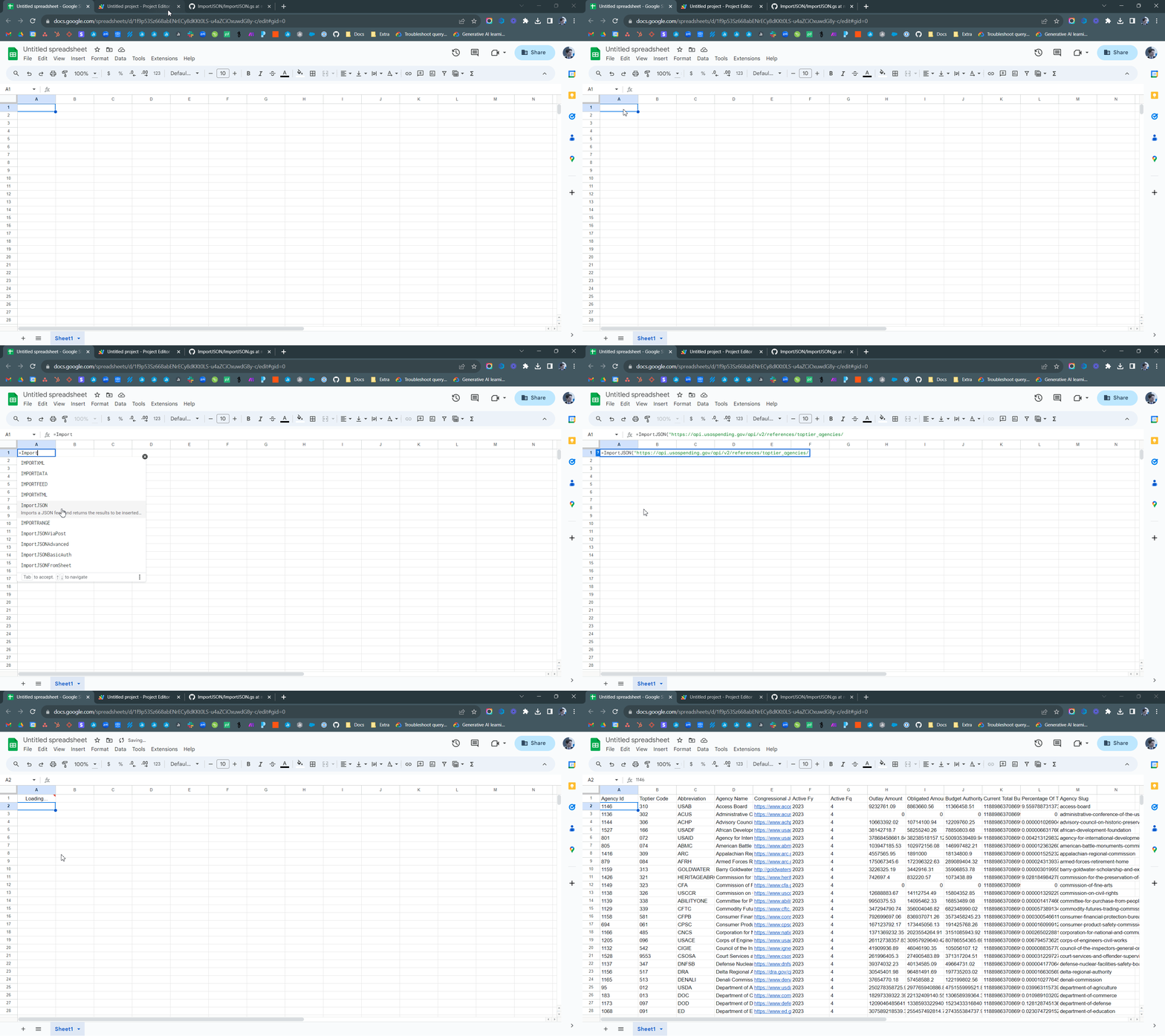
ImportJSON also accepts optional parameters for filtering and shaping nested data — these are documented directly in the script's comments (shown in green).
ImportJSON works well for simple, public APIs, but it isn't a one-size-fits-all solution. Keep the following in mind before relying on it for reporting:
- Authentication — Only works against APIs with Basic authentication or no authentication at all. Most other auth schemes (API keys, OAuth, etc.) aren't supported without modifying the script.
- Bot detection — Some APIs block requests that look automated rather than coming from a browser. The script doesn't attempt to work around this.
- Nested data — JSON isn't inherently two-dimensional, so deeply nested structures (objects containing arrays of objects, and so on) may not flatten into a usable table.
- Data volume — Large responses can hit size limits and fail silently or with an error, depending on the API.
- Sync frequency —
ImportJSONonly refreshes while the sheet is open in a browser. Once closed, the data goes stale until someone reopens it — this makes the approach best suited to data that rarely changes, or where occasional manual refreshes are acceptable. - Maintainability — The script is no longer actively maintained, so there's no guarantee it keeps working as Google updates the Apps Script platform.
If these limitations get in the way of building the reports or dashboards you need, set up a Custom Integration instead. It pulls data directly from the API into Databox as a dataset, without using a Google Sheet as a go-between.
If you'd rather have someone else find the best path forward, get in touch. Our team has experience connecting hundreds of different APIs and can help with custom solutions.

FAQ
Can I use ImportJSON with an API that requires an API key?
Not without modifying the script. As published, ImportJSON only supports Basic authentication or unauthenticated (public) APIs.
Why does ImportJSON return an error or blank cells?
This usually means the API requires authentication the script doesn't support, blocked the request as automated traffic, or returned a nested structure that doesn't flatten cleanly into a table. See the considerations above.


