


Custom metrics allow you to adapt reporting to your specific business goals and definitions. As your strategy evolves, some metrics may become outdated, duplicated, or no longer relevant. Regularly removing unused custom metrics keeps your account structured and easier to navigate, reduces confusion when selecting metrics, and helps your team focus on the data that matters most. By cleaning up metrics that are no longer needed, you maintain a streamlined reporting setup and improve overall usability across the app.
You can remove custom metrics individually, delete several at once, or clean up metrics that are no longer used anywhere in the app.
- Go to Reporting & analytics > Metrics > Custom Metrics.
- Click the drop-down arrow (
 ) next to Edit.
 - Select Delete.
- Confirm the deletion when prompted.
- Go to Reporting & analytics > Metrics > Custom Metrics.
- Click the drop-down arrow () next to Edit.
- Select the checkboxes next to the metrics you want to delete.
- Click the drop-down arrow () in the top-right corner.
- Select Delete.
- Confirm the deletion when prompted.
- Go to Reporting & analytics > Metrics > Custom Metrics.
- Click Cleanup to the left of the filter controls.
- Review the list of unused metrics.
- Select the metrics you want to remove, or select all.
- Click Delete selected.
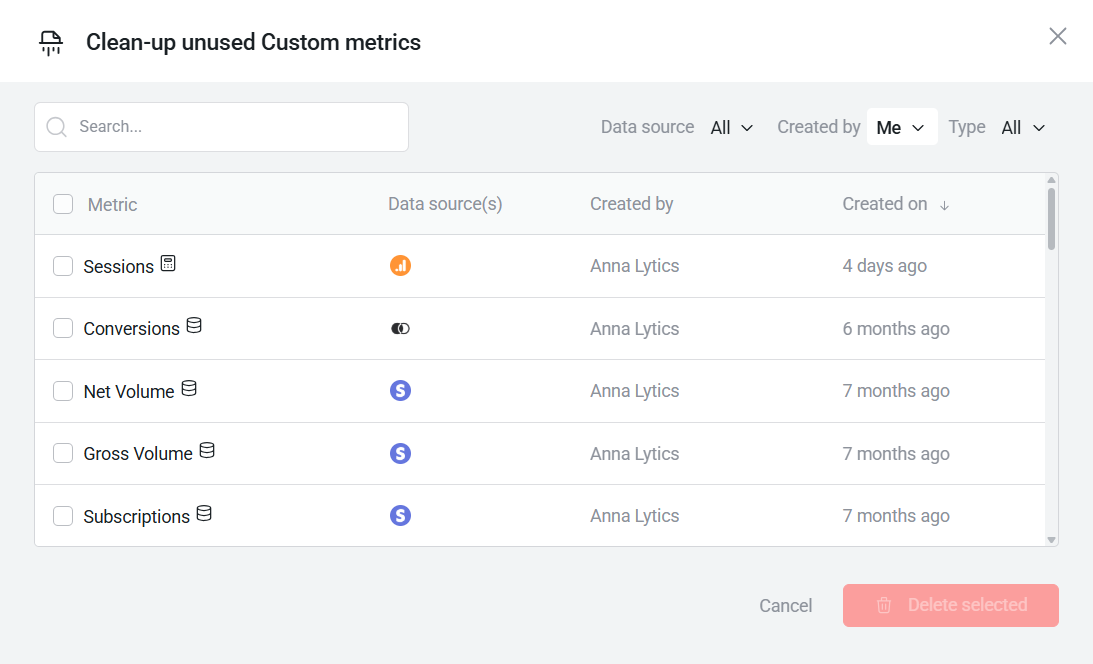
The cleanup tool only identifies metrics that are not in use at the time of review. If a metric is referenced anywhere in the app, it will not appear in this list.
FAQ
Can I restore a deleted custom metric?
No. Once deleted, a custom metric cannot be restored. You will need to recreate it manually if needed.
What happens if a metric is currently in use?
If you delete a metric that is in use, it will be removed from any content or features where it has been applied. As a result, related visualizations may appear blank or incomplete until a replacement metric is selected.


