


Users often delete dashboards to declutter their workspace, replace them with updated versions, or because they no longer seem relevant. However, a sudden need for historical data, a change in priorities, or an unintended deletion might make recovery necessary. This guide will walk you through the steps to restore a deleted dashboard and get back to your insights quickly.
All deleted dashboards are marked as "Recently deleted" and remain accessible for 30 days after deletion. During this period, you can view and restore them individually or in bulk from the dashboards page. Follow the steps below to restore a deleted dashboard:
- Navigate to the Dashboards page.
- In the filter bar, select Recently deleted.
- Hover over the dashboard(s) you want to restore.
- Click Restore to recover an individual dashboard, or:
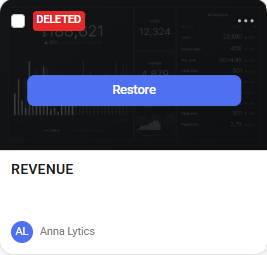
- To restore multiple dashboards at once, click the checkbox at the top left to select them, then click the drop-down arrow (
 ) at the top of the screen and choose Restore.

FAQ
Can I restore dashboards created and deleted by other users?
Yes, you are able to restore any dashboards that you had access to prior to their deletion.
Is it possible to recover a dashboard that was deleted more than 30 days ago?
No. Once a dashboard is deleted, it cannot be recovered after 30 days from the date of deletion.


