# Understanding client accounts

Client accounts enable agencies to create secure, isolated workspaces tailored to individual client needs. This structure facilitates customized tracking, reporting, and management while maintaining strict data security. By organizing client accounts hierarchically within an agency account, agencies can centralize control, streamline workflows, enhance data visibility, and simplify collaboration.

## What are client accounts?

Client accounts are secure, independent workspaces designed to meet the specific needs of individual clients. These accounts allow agencies to centralize data, deliver tailored reporting, and ensure privacy while maintaining streamlined management across all clients.

## Core functionality

- **Independent and Secure Workspaces**: Each client account functions as its own workspace, ensuring strict data isolation and privacy, preventing cross-client visibility, and safeguarding sensitive information.
- **Centralized Management**: Agencies can oversee multiple client accounts efficiently through a single agency account, maintaining full control over configurations while managing individual client needs.
- **Customized Reporting**: Build personalized Databoards, metrics, and goals aligned with each client's unique objectives.


## Additional benefits

- **Agency Branding**: Apply your branding to client accounts with the [White Label add-on](/how-to-white-label-databox) for a professional, seamless client experience.
- **Scalable Workflows**: Use templates to replicate Databoards, and [slide presentations](/create-a-slide-presentation) efficiently across multiple accounts.
- **Flexible Collaboration**: Agencies can share access securely with clients or manage reporting entirely from the agency side, based on client preferences.


## Access management

Access to client accounts is managed by the agency at the account level. Agencies can specify which users can access or manage a client account during its creation or through subsequent edits.

### Assign an account manager

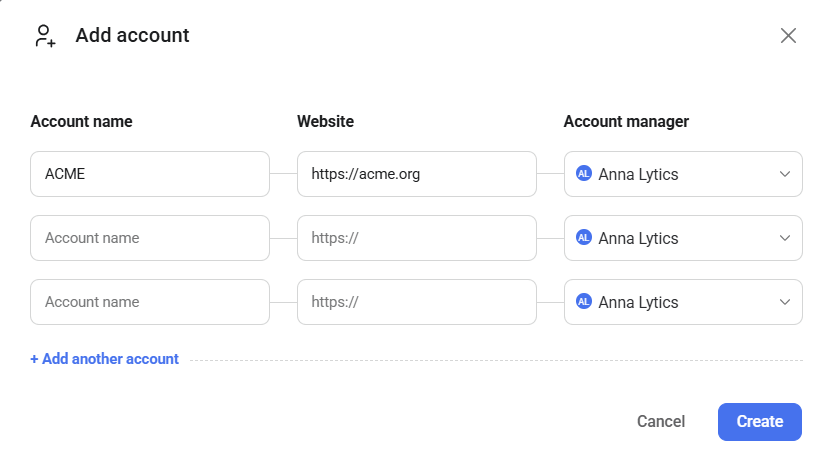
An account manager is an agency user responsible for managing the client relationship and performing any necessary setup to enhance the client's reporting process.

Each client account must have an account manager assigned at all times. This role is initially set during the account creation process but can be updated later if needed.

To change the account manager for a client account:

1. Navigate to [Account Management > Clients](https://account.databox.com/clients) and locate the desired client account.
2. Click **Edit**, then select the **General** tab.
3. Select the agency user to assign as the new account manager from the dropdown menu.
4. Click **Save** to confirm the changes.


assign-an-account-manager
### Set up agency user access

To manage agency user access to a client account:

1. Navigate to [Account Management > Clients](https://account.databox.com/clients) and locate the desired client account.
2. Click **Edit**, then select the **Agency Access** tab.
3. Choose from the following access options:
  - **All users**: Grants access to all agency users.
  - **Admins and selected users**: Grants access to all agency Admins and other specified users.
  - **Admins only**: Restricts access to agency users with the Admin role only.
4. Click **Save** to confirm the changes.


Agency users with the **Viewer** role cannot access client accounts, regardless of the selected access option.

When agency users log into a client account, they automatically inherit the **Admin** role for that account, regardless of their role in the agency account.

set-up-agency-user-access
### Set up client user access

To manage client user access for a client account:

1. Navigate to [Account Management > Clients](https://account.databox.com/clients) and locate the desired client account.
2. Click **Edit**, then select the **Client Access** tab.
3. Toggle the **Add client users** button to enable client user access.
4. Enter the client user's email address and select the [plan](https://databox.com/pricing) that best fits their needs. A 14-day free trial of the selected plan will start upon saving the changes.
5. Click **Save** to confirm the changes.


If the selected plan is lower than the agency's plan, certain features currently in use by the client may become restricted.

set-up-client-user-access
Once a client account is on a trial or active subscription, additional users can be added by both the agency and client users with appropriate permissions.

No, account managers do not receive any additional permissions within the client account. All agency users granted access to the client account automatically inherit the **Admin** role while logged in, regardless of whether they are assigned as the account manager.

These actions can only be performed by our team. Admins from both accounts must contact us directly with the necessary details, and we will make the required changes on the backend.


Ask Genie
Get instant answers or help with your data using the in-app AI assistant.

Talk to an expert
For customers: Get help with your setup, strategy, or making the most of Databox.

Book a demo
New to Databox? See how it works and get guidance on getting started.

Send an email
Reach out to support for help with your account, data, or technical issues.